


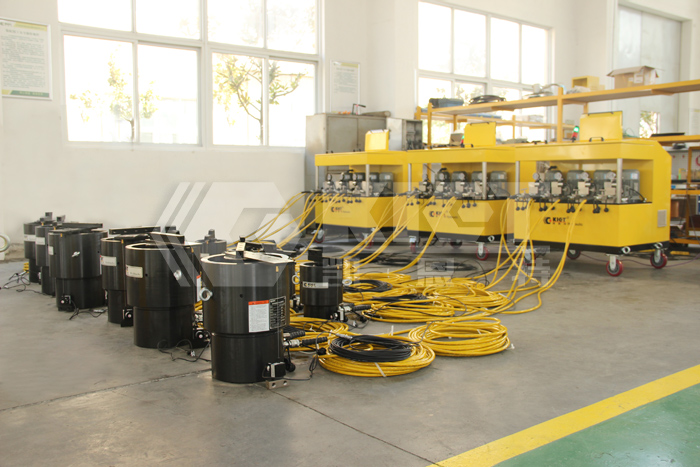
PLC hydraulic synchronous jacking system
PLC hydraulic synchronous jacking system working principle:
PLC hydraulic synchronous jacking system adopts advanced electrical, mechanical and hydraulic combination of high-precision synchronous control mode, using rigorous computer algorithms combined with advanced displacement and gravity sensors to control the flow rate of hydraulic pumping stations, so as to achieve accurate and uninterrupted control of heavy load objects. The displacement sensor and gravity sensor signal of the detection point reach the electrical control box through the signal transmission line, and are converted into jacking displacement and heavy-duty tonnage values after signal processing, and the motor command is issued by the electrical controller PLC to drive the hydraulic pumping station to supply oil and drive the hydraulic jack movement. At the same time, the displacement data is compared with the signal command, the error value is corrected and then the motor speed is changed, and the hydraulic jack is finally synchronized by calculating the uninterrupted signal comparison.
PLC hydraulic synchronous jacking system composition:
The control system is mainly composed of hydraulic pumping station and sensing system. Their functions are as follows:
1. Hydraulic pump station function
Read the pressure value of the station and connect the touch screen through the data cable to display it in real time;
Closed-loop control is carried out based on the collected data and commands are issued to the execution unit.
2. Sensing system - pressure sensor
The system pressure sensor refers to the detection device on the oil inlet side of the lower cavity of the jack;
Used to detect the working pressure of the calibration cylinder.
PLC hydraulic synchronous jacking system operation process:
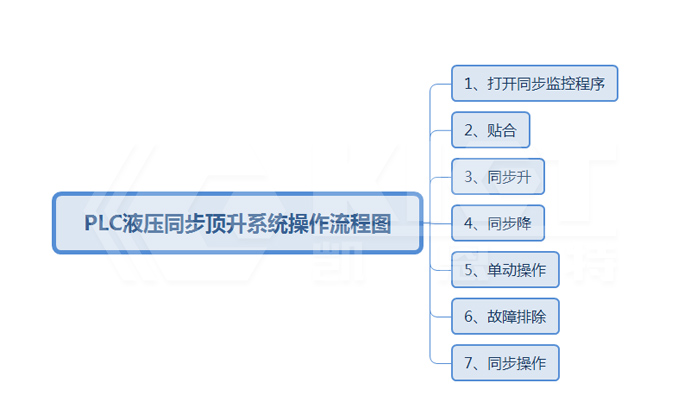
PLC hydraulic synchronous jacking system operation process:
1. Open the Synchronous Monitor:
2. Fitting: Enter the <设置>screen, first select the point to be jacked to open it, and then enter the <监控>screen to set the fitting pressure at each point. Open the total stop button, dial the single lock switch to the right position, and then press the <贴合>button, each top begins to jack, when the <贴合>light is on, it means <贴合>the action is over, and the synchronous jacking can be operated at this time. If you need to stop the operation during the lamination process, <停止>press the button. As shown in the figure:
3. Synchronous rise: <贴合>When the light is always on, the interface is displayed (the end of lamination). Go to <监控>the screen, set the upper limit of the displacement to be jacked, and press the <上升>button. The jack at each point starts to move, and when the displacement of the jack reaches the required jacking displacement, press the <停止>button. As shown in the figure:
4. Synchronous lower: When the <贴合>light is always on, enter the <设置>screen, set the lower limit of the displacement to be jacked, and press the <下降>button. If you need to stop pressing <停止>the button, you can do it.
5. Single action operation: enter the <设置>screen, first select the point to be jacked, and <单动锁>dial the switch to the unlock (left) position (if you turn from the synchronization state to the single action, you need to exit the synchronization state first, and then dial the single action lock switch to the locking position), and then operate<升>, <降>button, when the single action is raised, <升>the button indicator is flashing. When lowering with a single movement, <降>the button indicator is flashing.
6. When there is a large synchronization error in the synchronous lifting process, the system will automatically stop and send out an alarm signal, and the alarm stop when the error is ≥ set value, at this time, you need to press the general stop button immediately to check the cause of the fault. Troubleshooting can be continued after jacking.
7. Transfer from single-action operation to synchronous operation: Dial the single-action lock switch to the unlock (right) position, press the lamination button, and operate the synchronization when the lamination light is always on.
You may also want to know: